The following links provide resources, lessons, primary sources, maps, and other information for Social Studies in grades K-12. The list will be updated as more become available and known.
https://www.c-span.org/classroom/ (5th grade and up)
Common Sense: 10 Best Social Studies Tools: Elementary School
iCivics (5th grade and up)
Digital History (3rd grade and up)
National Council for the Social Studies (all grades)
Best Social Studies Sites (pdf) (elementary)
Smithsonian Learning Lab
EDSITEment (all grade levels)
Timelines (link to a page with a plethora of other links to help make timelines)
Showing posts with label technology. Show all posts
Showing posts with label technology. Show all posts
Sunday, December 1, 2019

Wednesday, January 9, 2019
Slides Carnival

Free Google Slides themes, Canva templates, and PowerPoint templates for your and your student presentations
Create amazing looking presentations for Google Slides, PowerPoint, and Canva with free, easy to use, downloadable templates at SlideCarival.
Wednesday, May 30, 2018
Word Tamer
Develop characters, settings, and plots with Wordtamer, an interactive site, going through a carnival atmosphere, using literary devices. The player will journey through the carnival and develop characters, a setting, and a plot for their very own story. Students watch videos along the way to ensure understanding of crafting a good story.

Monday, May 28, 2018
"Grading Smarter, Not Harder" week 5: Creativity (Part 3)
Using Modern Technology to Encourage Creativity
Part III
Not all schools, or even grade levels, allow the use of personal devices in the classroom. With that being said, there are other ways to implement some of the following practices in classroom. Practicing digital safety, and learning how to be a safe and responsible digital learner (and teacher) is a the forefront of educational practices today. The 21st Century Skills should be implemented throughout all curricula and understood by all educators.
Strategy #1: Use Twitter for Class Discussion and Test
Pose a question or problem to the class and students have to tweet back their response. This will give students practice in stating cases and rebuttals as concisely as possible. Use hashtags unique to the class, i.e. #MrPHistory
Create a Twitter Tuesday where during the last 10 minutes of class, or the day, students can converse
Wednesday, May 9, 2018
Txt Msg Cls Tool
The following site gives you and students a fun way to work with dialogue. Create fun, made up text messages between two characters from a story, have a dialogue between two historic figures to show analytical thinking and creativity (George Washington texting King George III?, Einstein and Hawking have a scientific conversation?, etc). The possibilities are endless. Get the kids writing and thinking outside of the box. They can take a screenshot and paste into a Google Doc or Slides for a quick presentation.
Click here to explore more.

Click here to explore more.

Thursday, April 19, 2018
Search YouTube videos in the classroom without the distractions of ads and other video on the screen with this website, Tube.


Wednesday, April 18, 2018
Animated History resource
The following site is a great resource for animations and interactive interface for teaching history and social studies. There are several activities and animations for teaching the American Revolution, including battles, for fifth grade lessons.
Tuesday, April 17, 2018
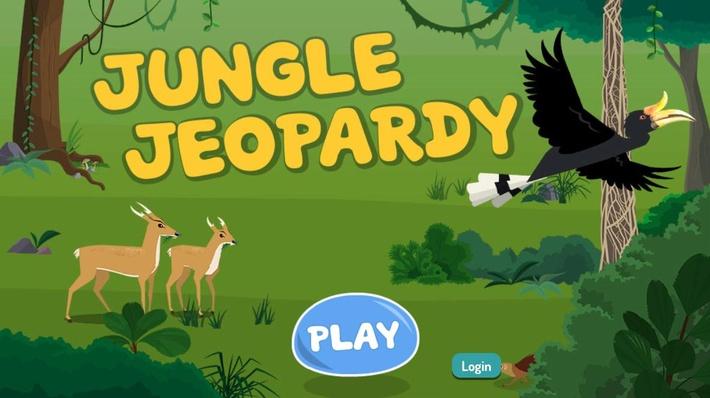
Jungle Jeopardy: An Ecosystem Game
Jungle Jeopardy, a PBS Kids site, is geared for students in kindergarten thru fourth grade. In this interactive game students are to create a balance in a rain forest ecosystem, keeping alive each animal over a period of 12 days. Students learn about different species of plants and animals in a rain forest and how they depend on each other. Experiment with changing one resource at a time (variables) and how the affect the whole system.
You can find a link on our Staff Resource Padlet as well.
You can find a link on our Staff Resource Padlet as well.
Monday, February 26, 2018
Make Believe Comix
Creating short comic strips can help students synthesis what they have learned. Sequencing, focusing on the main idea, creating a visual for a story they are writing, summarizing a social studies or science topic, writing dialogue, or just having fun and begin creative are some of the skills practiced when creating a comic strip. Make Believe Comix is a resource students can use easily online and share, or print at home. Students can create a comic strip using three to nine panels. What can your students create when they use Make Believe Comix?
Wednesday, February 14, 2018
Making North America : Interactive Map
Making North America | Interactive Map
Discover how North America took its shape by visiting geological sites across the continent, searching for clues in the landscape, and viewing episodes from the broadcast series Making North America, in this interactive produced by NOVA. In Expedition, hunt for clues that help explain how geological forces shaped North America, find artifacts that reveal how the landscape influenced life, and search for evidence that exposes how humans turned rocks into riches. In Explore, click on map pins to study landscapes and watch video clips that cover relevant science topics. In Watch, stream the series’ three episodes: Origins, Life, and Human. This resource is part of the NOVA: Making North America Collection.
This interactive activity requires Adobe Flash Player.
Visit the program page here.

Friday, October 27, 2017
Performing Arts in 360 Degrees
Experience Performing Arts in 360 Degrees
 Performing Arts, part of the Google Cultural Institute, is a website that allows you to experience music, opera, theater, and dance in 360 degree images and videos.
 Friday, October 13, 2017
Animated Maps: A History / Social Studies Resource
Analyzing and interpreting maps is part of the Social Studies learning standards for most elementary and middle school grades. Mapping History, produced by the University of Oregon, features lots of animated maps illustrating problems, patterns, and events throughout history. Mapping History is essentially a digital atlas of American, European, Latin American, and African history. Each section is divided into modules based on historical themes and eras.

Applications for Education
Mapping History is a resource to bookmark for the next time that you need a thematic map to illustrate a pattern in history. I found that some of the maps will also be useful as question prompts. For example, this map prompts students to evaluate the extent to which the expansion of slavery in the U.S. was connected to the demand for cotton.

Applications for Education
Mapping History is a resource to bookmark for the next time that you need a thematic map to illustrate a pattern in history. I found that some of the maps will also be useful as question prompts. For example, this map prompts students to evaluate the extent to which the expansion of slavery in the U.S. was connected to the demand for cotton.
Monday, October 9, 2017
Google Help: Black Menu for Google
I wanted to share with you an excellent Google Extension I have been using for over a year. It is called Black Menu for Google. When you go to Google Web Store and search Black Menu for Google.


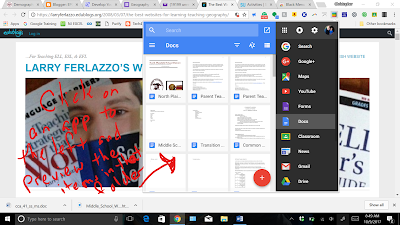

When in use and you click the icon, you will have a drop-down menu that looks like this:

Customize the scrolled menu on the right by scrolling all the way down and clicking add. Your dropdown will look like this:

When you click on one of the apps on the right, all the items of that kind will appear on the left side of the drop-down. Here, you can scroll through all the items of that time (Documents, Sheets, Slides, Drawings, etc.) Or, you may click the button at the bottom right corner of that window to create a new. You can even compose a new email with Google email in the drop-down menu.

This is a great tool to use if you don't want to open a new window and search for your items or create a new one. It is quicker and easier, in my opinion, to use and makes your work more effective.
Go ahead, give it a shot. My students have been using it for the last few weeks and have been able to find items a lot quicker, saving on class time.
Have fun.
Digital Timelines
Digital Timelines
The use and analyzing of timelines is a skill we try to teach our students each year. As teachers we usually pull out the ruler or yardsticks, some bigger paper, or attempt to fit into a notebook. Sutori.com is a free, web based application to create digital timelines. What a great tool to use in Social Studies, Language Arts, or any subject to show sequence/chronological order.
Explore, and share with your students. Create beautiful, colorful, and engaging timelines for project-based learning projects.
Embed videos, photos, texts, maps, and graphs on timelines for projects.
The use and analyzing of timelines is a skill we try to teach our students each year. As teachers we usually pull out the ruler or yardsticks, some bigger paper, or attempt to fit into a notebook. Sutori.com is a free, web based application to create digital timelines. What a great tool to use in Social Studies, Language Arts, or any subject to show sequence/chronological order.
Explore, and share with your students. Create beautiful, colorful, and engaging timelines for project-based learning projects.
Embed videos, photos, texts, maps, and graphs on timelines for projects.
Sunday, October 8, 2017
Extreme Planet Makeover
Extreme Planet Makeover

Extreme Planet Makeover is an interactive activity produced by NASA as a part of the Exoplanet Exploration website. Extreme Planet Makeover lets students choose the size of a planet, position relative to the largest and nearest star, and planet age. Students instantly get feedback on the characteristics of the planets they create. For example, if it is too small and too far from a star students will see that they created an iceball planet.
Extreme Planet Makeover is one of four Exoplanet Exploration interactive activities. The other three are Interstellar Trip Planner, Alien Safari (I previously featured these here), and Five Ways to Find a Planet (review coming next week).
Applications for Education
Extreme Planet Makeover is a simple interactive that students could use for a few minutes to see how the relative size and position of planets contribute to their characteristics.
Thursday, September 28, 2017
Test Prep Doesn't Have to Be Overwhelming
STANDARDIZED TESTING
Test Prep Doesn’t Have to Be Overwhelming
Help your students use technology and build their confidence—and teach them to speak the tests’ language.
March 10, 2009 Updated March 15, 2017

Testing is just around the corner. Whether tests are designed by the Smarter Balanced Assessment Consortium (SCAC) or the Partnership for Assessment of Readiness for College and Careers (PARCC), schools nationwide are most likely beginning those additional meetings, signing legal documents full of security warnings, and sending out robocalls with such sage wisdom as “Get sleep.”
Test prep generally takes the form of practice questions, daily drills at the start of class, or worse, a halting of curriculum altogether for the sake of administering entire packets of daily test questions. I recently (continue reading>>)
Tuesday, September 26, 2017
This blog by Richad Byrne offers so much technology links, tips, and help for teachers, and it is all for FREE. Can't get any better than that.
There is a lot to look at here and I encourage everybody to peruse his page.

Continue here>>
There is a lot to look at here and I encourage everybody to peruse his page.
Continue here>>
Wednesday, September 20, 2017
60 Ways Math Teachers Can Use Google Classroom
I have been asked by math teachers how they can use Google Classroom. Google Classroom is great for any subject area, especially math! Earlier I had posted on 5 ways Students Can Use Google Docs in Math. This builds on those ideas with a list of 60 ways Google Classroom can be used by Math teachers.
- Create a blended classroom: Google Classroom is the perfect tool to transform a traditional class into a blended model.
- Go paperless: There are many ways that Google Classroom can support a paperless classroom. Stop standing at the copy machine and use Google Classroom instead.
- Distribute (click here for full article/post)
Teaching Strategies -- Teacher Tech: How the Google Suite Can Enhance Open-Ended Math Exploration
How the Google Suite Can Enhance Open-Ended Math Exploration
 (iStock/shironosov)
Subscribe to:
Posts (Atom)